
What makes Payload different
Define the content model. Payload provides the editing interface.
We specify the information a product, article or event needs and how those records relate. Payload generates the input forms and APIs from that model, so each custom data structure does not need a separate administration tool.
Payload integrates directly with Next.js. The website and CMS can be developed, tested and released together. Content fields and access rules also live in source code, making changes reviewable and testable on staging before release.
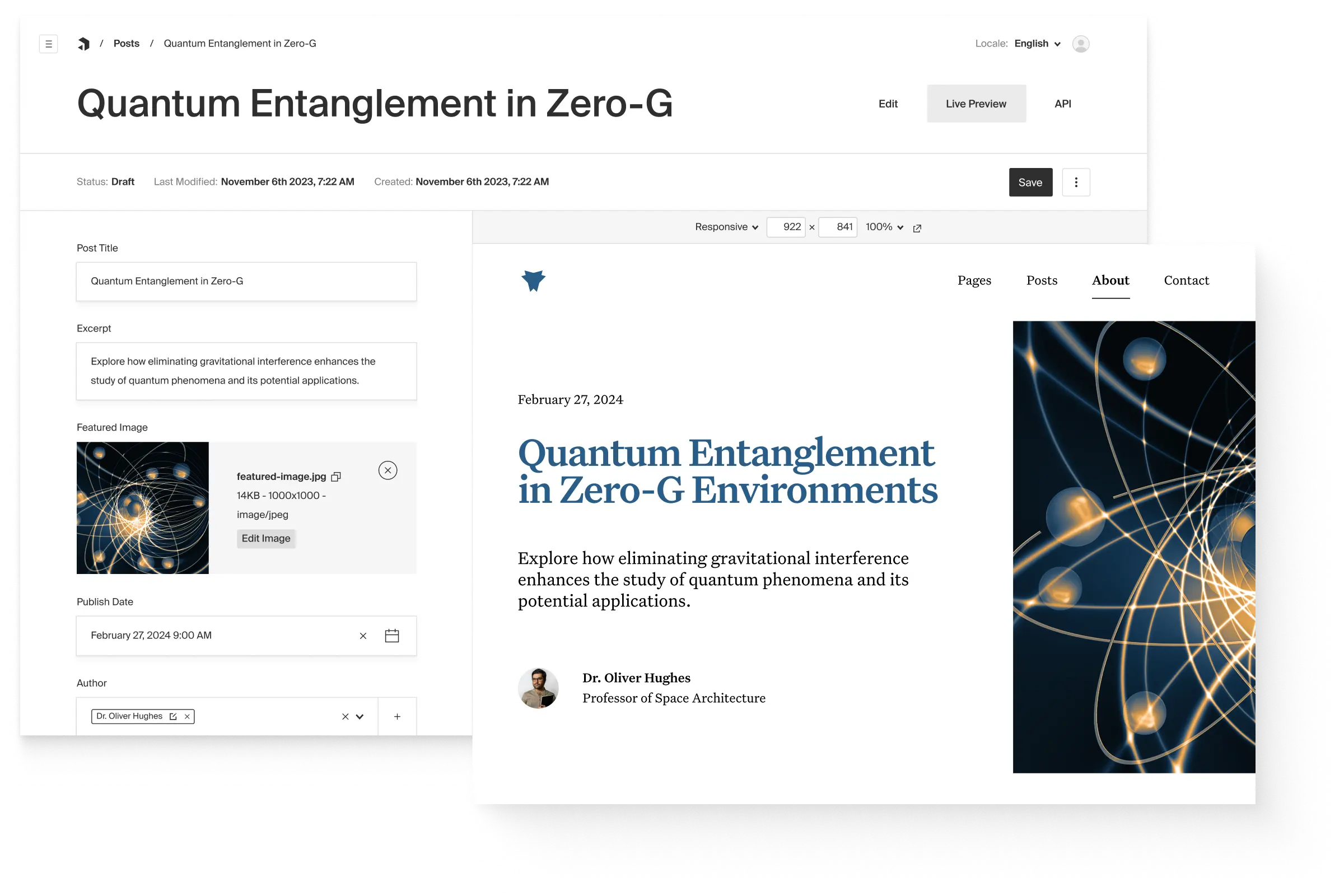
Edit an article alongside its preview
Editors maintain the title, images and other fields while Live Preview shows the page. This official Payload product view illustrates both sides.
Product view: © Payload
Official Payload headless CMS product view
Websites, portals and catalogues built with Payload
Payload handles content, user accounts and access rules. We use those capabilities to build features such as product catalogues and restricted document libraries.
Corporate websites and magazines
Bespoke websites with reusable components, multiple languages and live preview. Editors can work with drafts and previous versions within the CMS.
Customer and partner portals
Restricted documents, personal information and customer requests. Accounts and access controls provide the foundation; we develop the portal interface and its functions around them.
Product and service catalogues
Offers with custom attributes, filters and links to business systems. The same data can serve a website, an app or a restricted area.
Internal tools and digital services
Event registration, membership administration or application processing, for example. Payload handles data and permissions; the business workflow is built for the task.
Payload setup and application development
Before choosing the system, we establish who will use it, which workflows it must support and what software is already in place.
- Planning and design: content structure, data models, navigation and prototypes for both the editorial interface and the application.
- Development and integration: page components, user areas, permissions and connections to existing systems.
- Search and accessibility: indexable pages, metadata, redirects and accessible interaction planned and checked from the outset.
- Migration and release: data transfer, staging tests, coordinated deployment and editorial onboarding.
- Ongoing care: security updates, backups, monitoring and development, with agreed responsibility for the database and hosting.
Open source, now part of Figma
Development of Payload began in 2019, followed by its public launch in 2021 and adoption of the MIT licence in 2022. Figma acquired Payload in 2025. Both companies committed to keeping it open source and self-hostable, with the existing team continuing development.
For a project, that means access to the source code, a choice of infrastructure and the ability for another team to take over. Open source removes the CMS licence fee, not the cost of development, hosting or maintenance.
Give AI tools access to content through MCP
Payload’s official MCP plugin can give AI tools controlled access to content, for example to retrieve product information or create a draft. We configure what may be read or changed and how editors review the result. A complete chatbot still needs its own search, interface and application logic.
Payload, Storyblok or specialist software?
The right CMS depends on editorial tasks, existing technology and the intended operating model. We compare Payload with Storyblok, Craft and TYPO3. For a shop or learning platform, specialist software also belongs on the shortlist.
- Headless CMS adviceCompare Payload, Storyblok and TYPO3 independently
- StoryblokVisual editing in a cloud-hosted CMS
- Craft CMSCorporate websites and magazines with flexible components
- Web applicationsCustom workflows, data models and integrations
- AccessibilityNavigation, forms and accessible web applications